On Sept. 9, a brand new, but very similar, iPhone will be available for pre-order. If you’re after a new phone, you may be considering the payment plan that Apple introduced last year, the iPhone Upgrade Program, a monthly installment program that promises a new phone each year. Or perhaps you got roped into it last year, assuming that Apple was going to introduce a markedly new phone this year.
On Sept. 9, a brand new, but very similar, iPhone will be available for pre-order. If you’re after a new phone, you may be considering the payment plan that Apple $AAPL introduced last year, the iPhone Upgrade Program, a monthly installment program that promises a new phone each year. Or perhaps you got roped into it last year, assuming that Apple was going to introduce a markedly new phone this year.
Either way, if you want to know whether signing up for the program is the right move for you, or you’re already on board and want to know how to get your next iPhone, this is the guide for you.
Join 500,000+ readers who start their day with Quartz.
By subscribing, you agree to our Terms of Service and Privacy Policy.
This really depends on how much you want the latest iPhone when it comes out. If you’re an early-adopter that always needs to have the newest gadgets, and are willing to pay for them, the iPhone Upgrade Program might be for you.
Essentially, the scheme is a 24-month financing program, where the price of the iPhone is spread over the course of the contract, and where the phone is yours at the end of it. (The contract resets when you exchange your phone for a new one, but more on that later.)
So, if you were to buy an 128 GB iPhone 7, it would cost you $749 to buy it outright. (And if you added on Apple’s insurance program, AppleCare+, the phone would run you a total of $878.)
If you enrolled in the upgrade program, you would pay $36.58 a month for 24 months, which comes to $877.92, or a saving of exactly $0.08. (The upgrade program includes the cost of AppleCare+.)
If you don’t think 8 cents is worth the hassle, you can also look at it this way: Every year, you’re getting a new phone, and every year you’re only paying half of that contract, effectively making the cost of that new iPhone $438.96.
The only downside of this logic is that for that to hold up, you essentially have to stay enrolled in the program forever. The minute you decide you want out of Apple’s walled garden, you’ll have to pay off what’s remaining on your contract. So if you’re enrolled in the program for three years, you’ll get three iPhones, but you’ll have to keep paying for a fourth year. Hopefully the iPhone 9 is a really great device.
Otherwise, there’s always the option to buy a new iPhone outright and then sell it online on sites like eBay or Gazelle. For example, a well-treated 64 GB iPhone 6S Plus is currently worth $300 on Gazelle, meaning if you were to buy a mid-range iPhone Plus every year and then sell it, each phone would cost you roughly $449—basically the same price as a phone each year on the iPhone Upgrade Program, just without the commitment to signing up for a rolling 24-month contract. (And AppleCare+, for what it’s worth.)
If you’re still convinced you want to stay in Apple’s sleek, aluminum embrace for the foreseeable future, here’s how to join the program:
But it’s worth keeping in mind: Citizens shares your information, including your credit score and income, with “affiliates” for marketing purposes.
If you’re already enrolled in the program, here’s what you need to do to get your next iPhone:
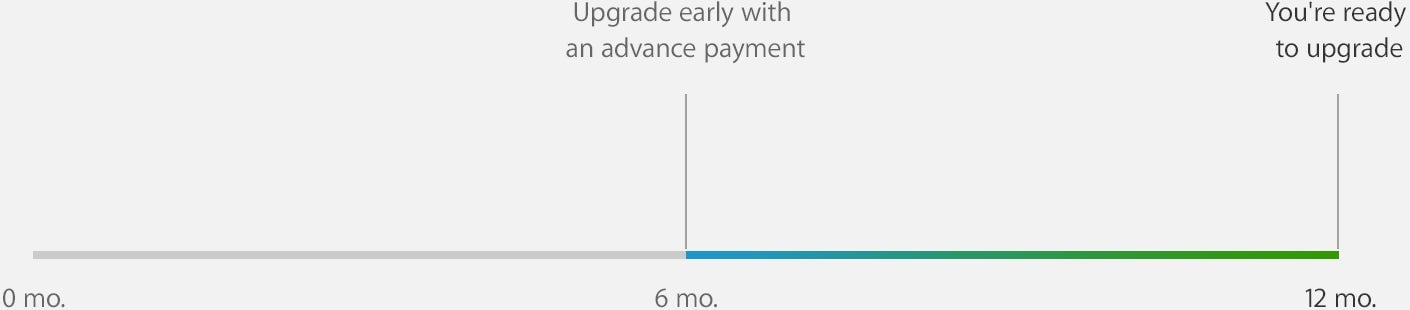
The upgrade program is a two-year contract where you can get a new phone every year, but you can actually get that phone after just six months on the contract, assuming you’re happy paying off the rest of the year’s monthly payments. Here’s Apple’s handy graphic to explain this:
To find out if you’re able to get a new iPhone through the program, use Apple’s tool on its website. You’ll just need to provide your phone’s serial number and the last four digits of the IMEI number (a unique identifying number that all phones are required to have). You can find these on the iPhone in Settings > General > About.
To upgrade, you’ll have to actually visit an Apple store. Make an appointment online at the closest store to you from Friday Sept. 9, but be warned: Just about everyone else will likely be trying to do the same thing. If you really, really want to get an appointment on the first day, Apple starts taking online reservations at 12:01 am PT on Friday.
You’ll also need to do everything you needed to enroll in the program in the first place again, such as bring two forms of identification, and pass a credit check.
You’ll have to hand over your old iPhone, so make sure it’s in good working order, and that you’ve wiped it clean of any personal information before heading to the store. Make sure to back up your data, too. Apple confirmed to Quartz that you don’t need to bring the phone’s original box, or USB cable or charger—just bring the phone itself.
